
If you
remove subscribe to: post (atom) on your blogger blog. Show the bellow tutorial
and enjoy.

Hide, Delete or Remove Subscribe to Posts Atom from Blogger:
- Login to your Blogger Dashboard click here
- Select your blog and click on right side bar
- Select Template on drop down menu
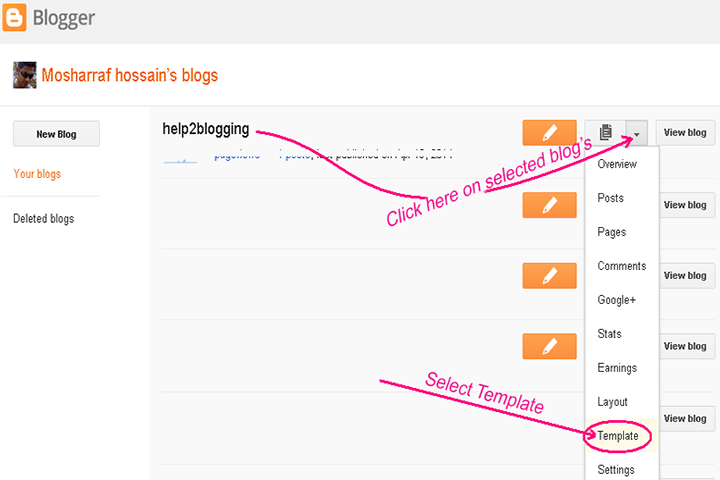
Remove subscribe to posts (atom) in Blogger template:
- Click "Template" button on left side
Now make a backup of your blogger template because if you
have any wrong this template after edited, you can restore this. So click on Backup /Restore and download Full Template. Tutorial details.
- Click on "Edit HTML" button

- Click anywhere inside the code area and press the CTRL + F keys on your keyboard to open the Blogger' search box.
A. Write Search box
<b:include data='feedLinks' name='feedLinksBody'/>
then hit Enter key on your keyboard and find this tag
B. Remove this tag
C. Click Save Template
button

That's all.
Now your blog removed 'Subscribe to: Post Comments (Atom)
-----------------------------------------------------
If you have any question and suggestions related blogger
Thanks to follow this tutorial
Best regards
help2blogging team


Comments
Post a Comment