
If you need stylish or beautiful any color scroll bar on your blog right side and footer side You can easily to follow the bellow lesson and make your choice.

How to change Blogger color scroll bar:
- Firstly Login to your Blogger Dashboard click here
- Select your blog and click
on right side bar
- Select Template on drop down menu
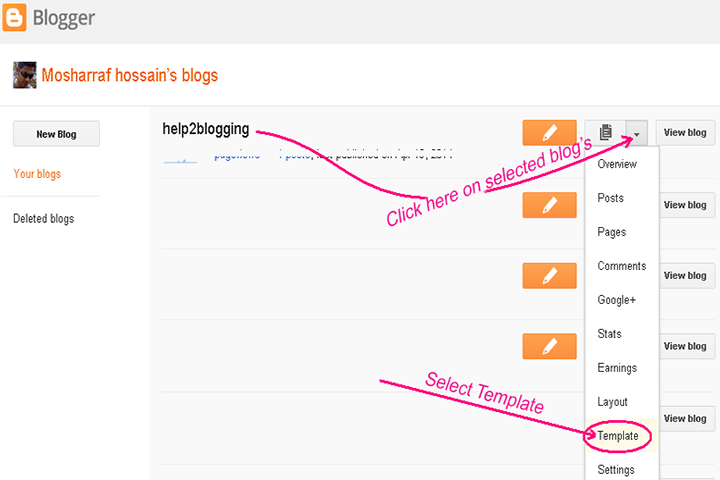
Now Customize scroll bar in blogger template:
Now create a backup of your blogger templates. Because if you have any error after updating your blog. You can restore it. So click on Backup / Restore button and download Full Template.
> Click on Edit HTML button

> Click anywhere inside the
code area and press the CTRL + F keys on your keyboard to open the HTML search
box.
> Type ]]></b:skin>
inside the search box then hit Enter on keyboard to find it:
> Now past the below code
before ]]></b:skin> code

Custom Scroll Bar Color Code:
/* Edited by help2blogging.blogspot.com */
::-webkit-scrollbar{width:15px;background:rgba(0,0,0,.07);}
::-webkit-scrollbar-thumb{background:#f90;-webkit-border-radius:10px;-moz-border-radius:10px;-o-border-radius:10px;border-radius:10px;}
/* Edited by help2blogging.blogspot.com */
Tips: If you can change
color. Please replace #f90
> Click
on the Save Template button
Thats all
—˜—˜—˜—˜—˜—˜—˜—˜—˜—˜—˜—˜—˜—˜—˜—˜ --------------------------------------
—˜—˜—˜—˜—˜—˜—˜—˜—˜—˜—˜—˜—˜—˜—˜—˜ --------------------------------------
If you have any
question and suggestions related blogger
Thanks to
follow this tutorial
Best regards
help2blogging team


Thanks for sharing such useful information in your blog.
ReplyDeleteSEO Company Bangalore
Nice Information Thanks For Sharing...
ReplyDeletewww.access1solution.com / Digital Marketing Agency in Bangalore India